Response Generator for Seller Support Associates
Designing a scalable, multilingual LLM experience for high-volume customer support
Overview
Seller Support associates handle millions of email-based support cases every year. Writing accurate, policy-compliant, and empathetic responses—often in non-English languages—was time-consuming, inconsistent, and difficult to audit at scale.
I led UX for Response Generator, an LLM-powered authoring tool embedded directly into the associate workflow. The system helps associates draft high-quality responses using structured annotations, case context, and SOPs—while preserving human control, auditability, and trust.
The feature is now fully launched worldwide, supporting both English and non-English cases, with 60% of external responses using AI and ~30% sent with no edits after launch.
Impact
Quantitative
- 60% of external seller responses now use AI
- ~30% sent with no edits, indicating high trust
- AHT improvements observed (up to ~60 seconds in earlier pilots)
- Statistically significant workload reduction across regions (EU, FE, NA)
Qualitative (Associate feedback)
- "This significantly cuts the email response drafting time."
- "I still write fast, but I use the generated phrases all the time."
- "Amazing!!!"
Problem
Associate pain points
- Writing responses from scratch increased Average Handle Time (AHT) and cognitive load.
- Inconsistent tone, structure, and policy adherence across regions.
- Non-English responses required translation or linguistic support.
- Auditors had no visibility into what AI generated vs. what the associate edited.
Business & system constraints
- Extremely high-volume workflows (seconds matter).
- Strict policy, quality, and compliance requirements.
- AI could not fully replace human judgment.
- Adoption had to be voluntary and measurable, not forced.
Design Goals
- Reduce drafting time without sacrificing quality or control
- Work inside existing workflows (no context switching)
- Support multilingual cases by default
- Make AI output transparent and auditable
- Enable real adoption, not dark-pattern usage
Solution
Core UX pattern: “Structured intent → Generated response”
Instead of prompting associates to “chat with AI,” the design anchors generation around how associates already work:
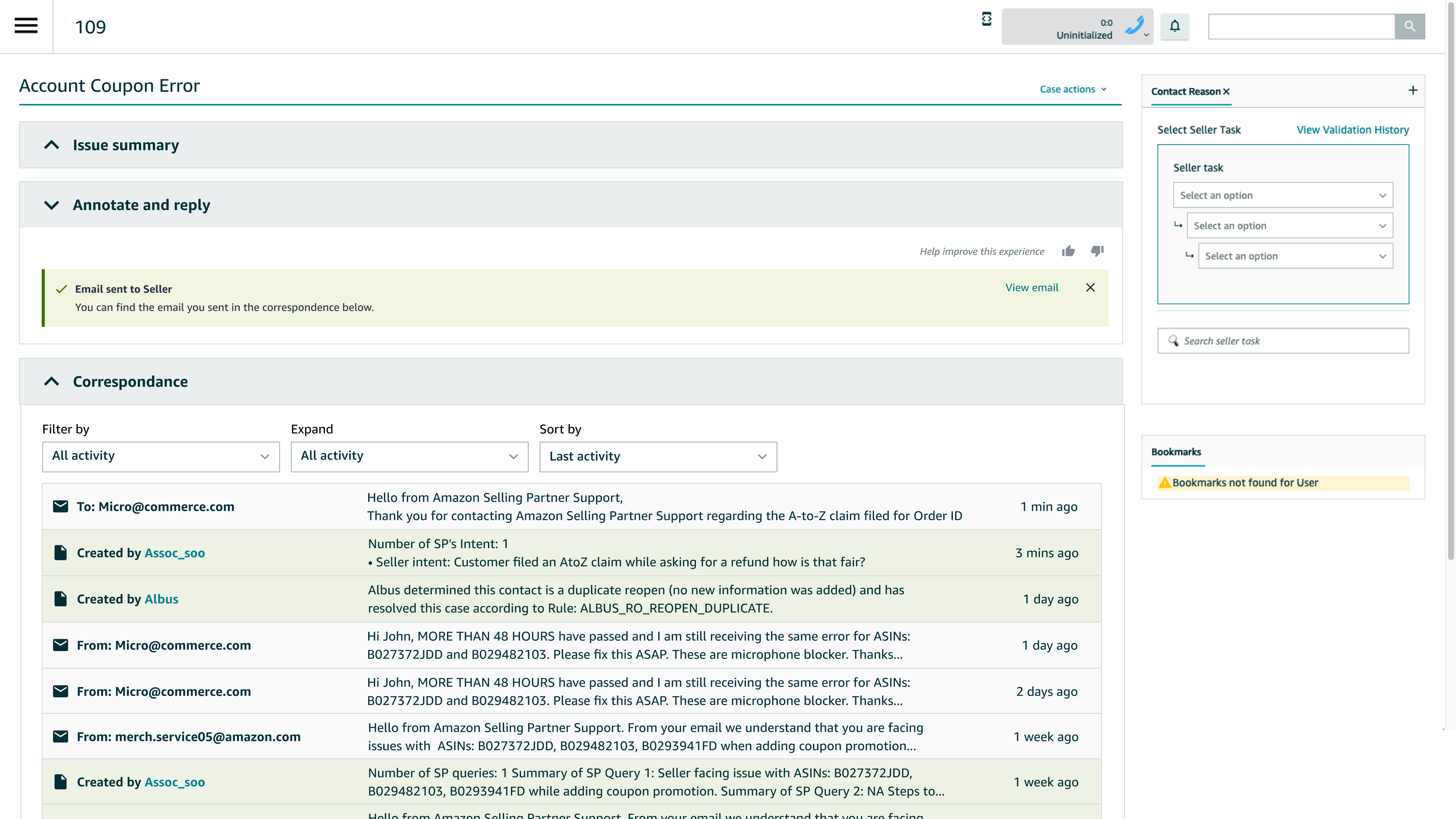
- Associate writes structured annotations (resolution intent, research, actions taken)
- AI generates a full seller-ready response
- Associate can edit, regenerate, bypass, or send as-is
- Auditors see the original AI output vs. final sent response
This keeps the associate firmly "in the loop."
Initial Research: Response Creation Insights (AXOs)
Response writing was where associates recovered time
After heavy diagnostic effort, associates optimized responses to protect metrics—often by reusing saved blurbs instead of writing case-specific replies.
Existing blurbs felt robotic and unclear
Associates relied on personal blurb libraries because system-provided language was overly policy-heavy, impersonal, and hard for sellers to understand.
High-quality responses required explanation, not just outcomes
Effective responses restated seller intent, explained why an outcome occurred, and clearly set expectations—directly reducing reopens.
Associates translated "Amazon speak" into seller-friendly language
A significant part of response effort was rewriting internal SOP language into clear, empathetic, human communication—especially when delivering bad news.
Response writing is judgment-heavy, not mechanical
Tenured associates adapted tone, structure, and content based on context, making it clear that automation must support human judgment, not replace it.
Key Design Decisions
1. Designing annotations, not prompts
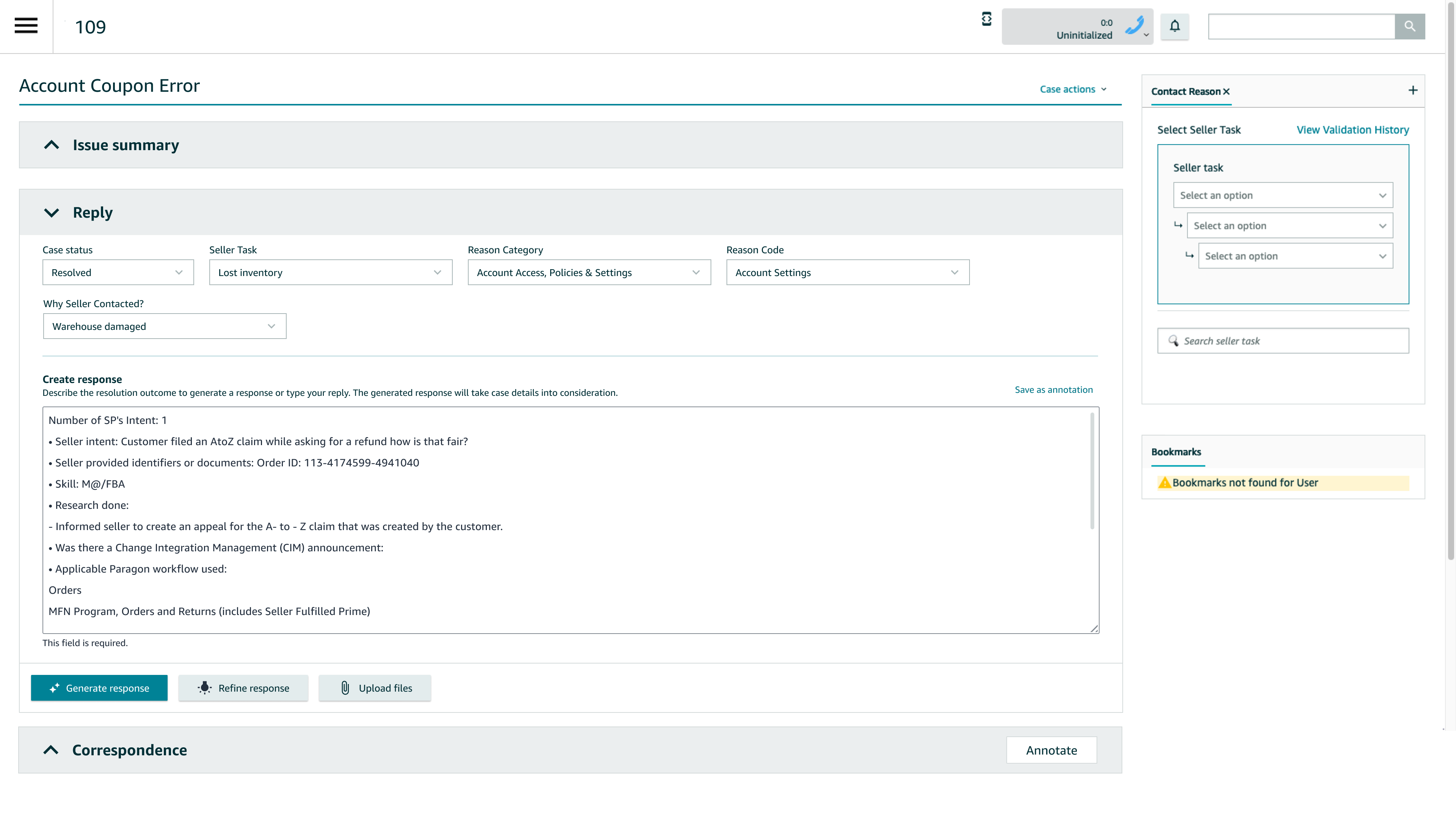
Early versions revealed that 69% of associates were typing full emails into the input field—negating AI benefits and skewing metrics.
UX response:
- Reframed the input as “Describe the resolution outcome”
- Added inline guidance to reinforce notes vs. email mental model
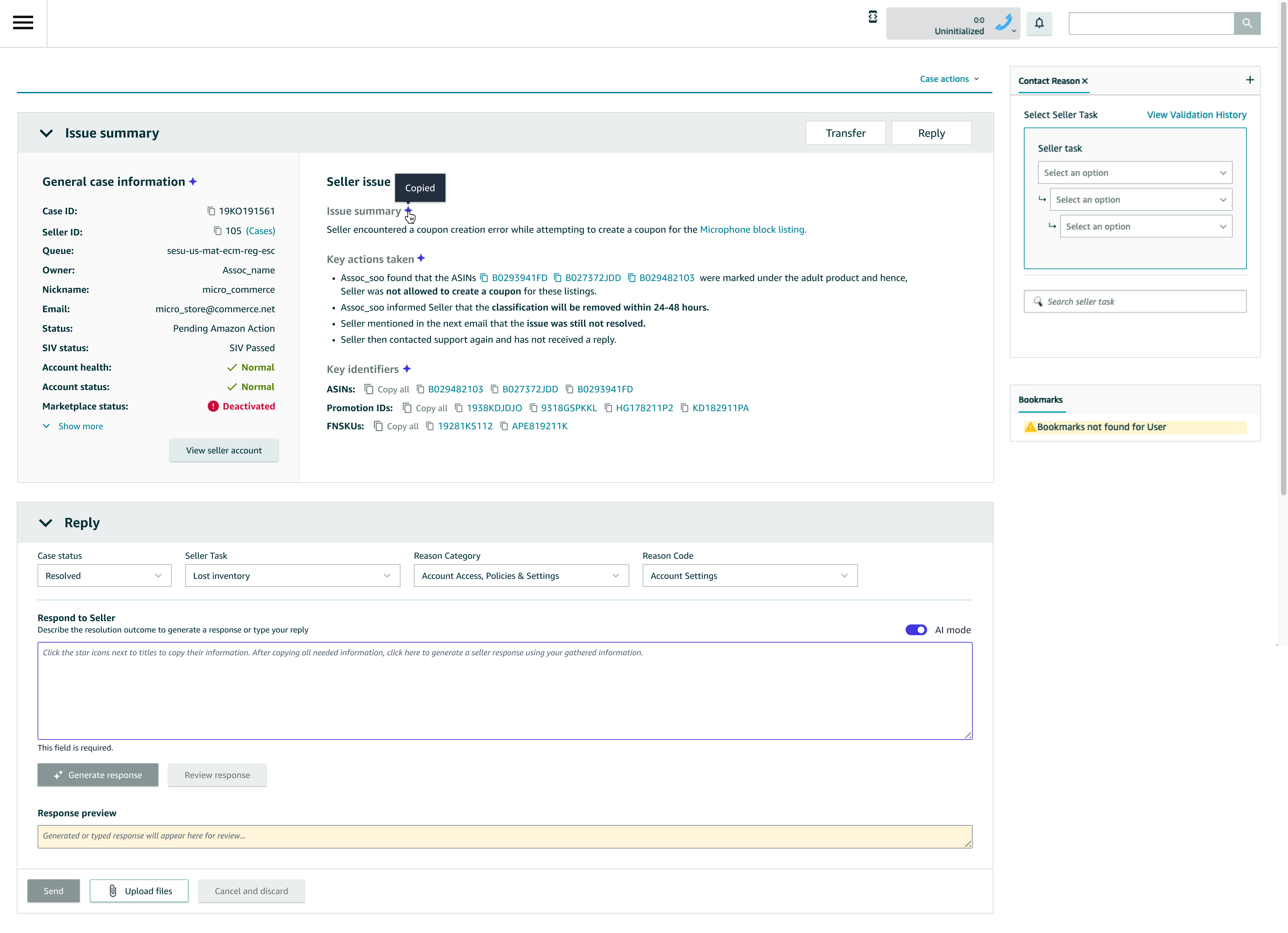
- Anchored generation on structured case fields (reason codes, workflows)
2. Optional AI, not forced AI
A version that removed the AI bypass increased confusion and reduced trust—especially among specialized teams like Paid Seller Support.
UX decision: Re-introduce an explicit AI bypass, making usage intentional and measurable.
Result: cleaner adoption data and higher trust from experienced associates.
3. Multilingual by default
The system automatically detects the case’s dominant language and generates responses using Claude Sonnet 3.7’s native multilingual capabilities, covering 13 languages representing 99.5% of non-English cases.
UX considerations:
- Clear language indicators
- Safe fallback to English
- Human auditing before global dial-up
4. Audit-first AI UX
For auditors, “black box AI” was unacceptable. I partnered with auditing teams to design:
- A dedicated audit view showing the raw AI-generated response
- Visibility into whether associates edited or sent as-is
- Weekly audit workflows that fit existing QA processes
This was critical for leadership approval and global rollout.
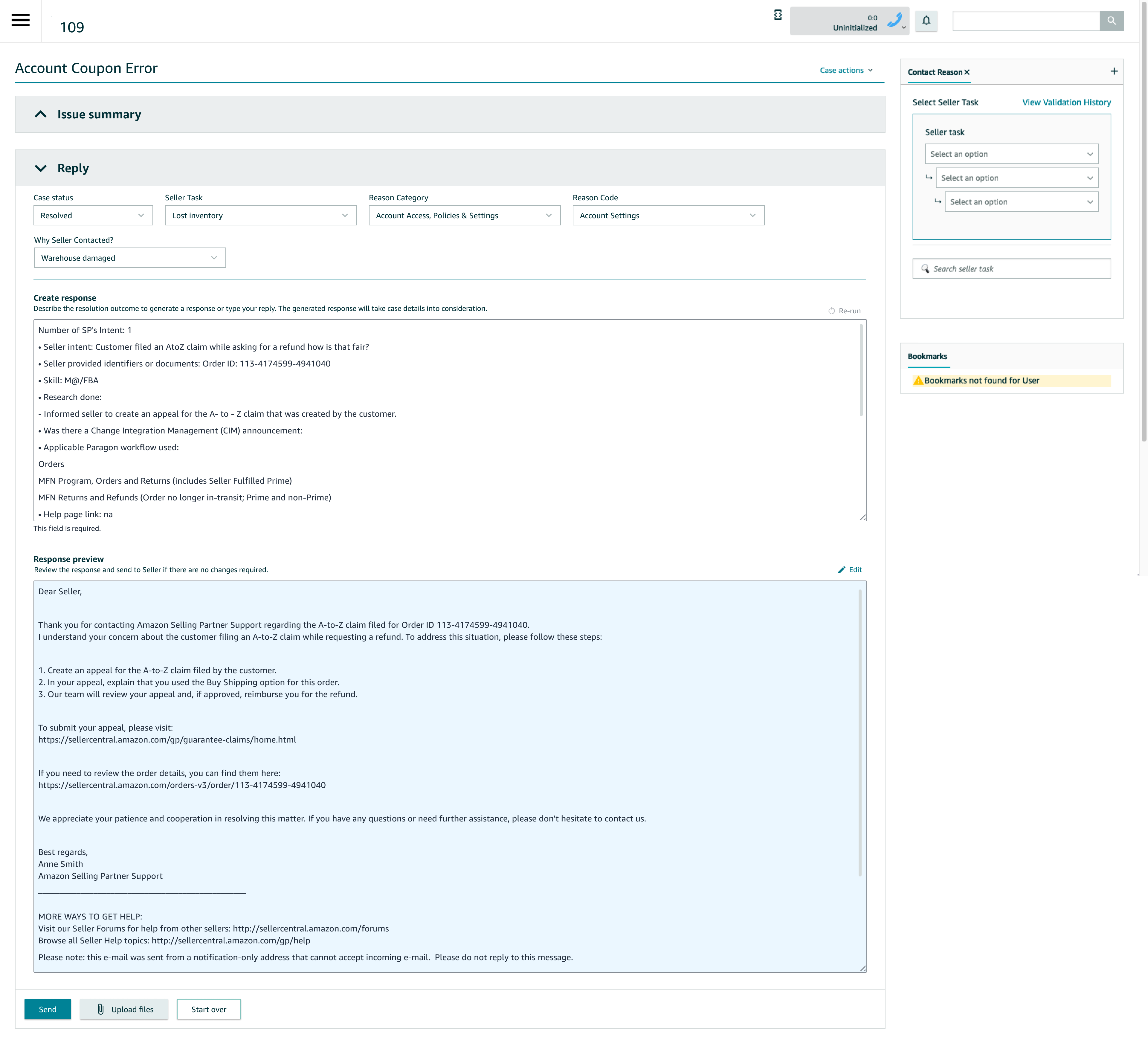
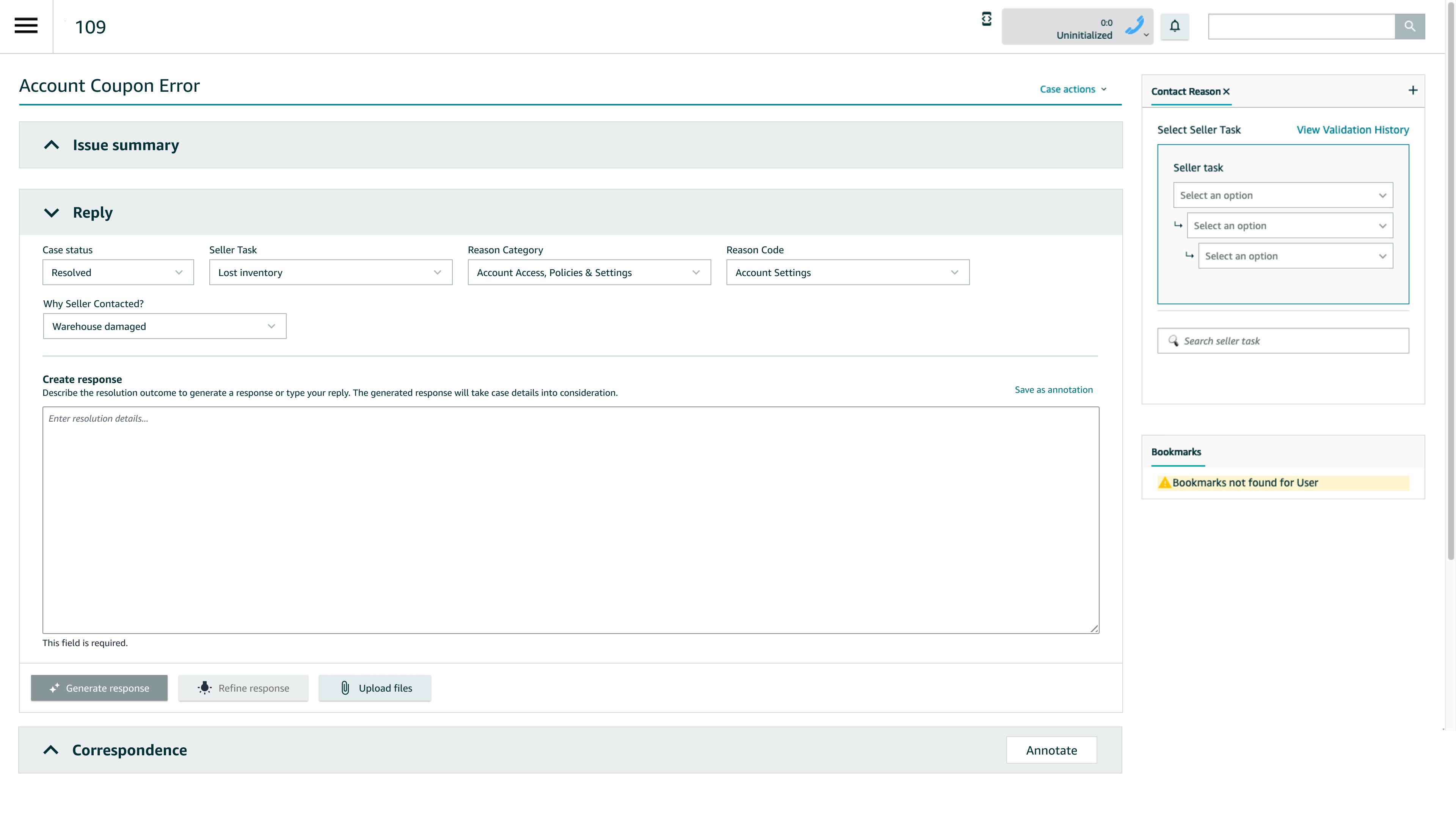
Example Flow (From the Mocks)
- Associate enters resolution details (structured notes)
- Clicks Generate response
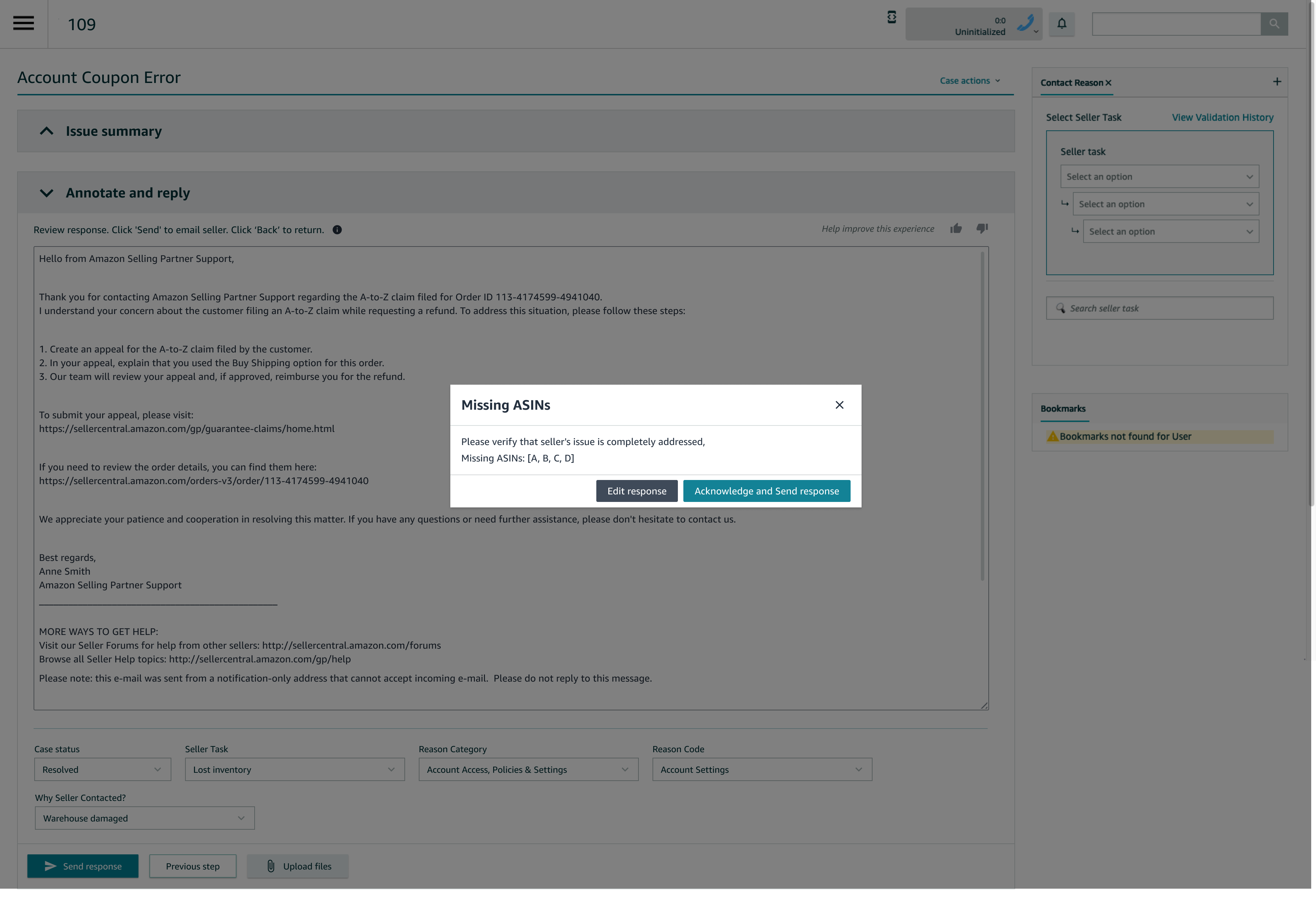
- Reviews AI-generated email with SOP links auto-inserted
- Edits or sends directly
- AI output + final message are logged for audit
- AI mode enables users to select what information needs to be included for context while generating a response
Post-Launch Validation & Learnings
AI adoption improves when it fits existing workflows
Associates organize work into Diagnose → Solve → Resolve. Response Generator was best understood and adopted when positioned as part of the Resolve step—not as a separate AI feature.
Structured inputs outperform free-form prompting
Associates trusted AI responses more when generation was based on annotations and case context, not raw prompts. This reduced robotic tone and improved relevance.
Personalization is critical to trust
Responses that automatically included seller identifiers, order details, and intent restatement felt higher quality and reduced reopen risk.
Optional AI drives credibility with experienced users
Tenured Associates and Specialists preferred having full control. Keeping AI optional (with a clear bypass) increased trust and allowed genuine adoption to be measured.
Highest value appears in unfamiliar or complex cases
Newer Associates and edge cases benefited most, reinforcing AI as a capability amplifier, not a replacement for expertise.
Transparency matters more than novelty
Associate skepticism stemmed from historical Paragon reliability issues, not AI itself. Audit views showing raw AI output vs. edited responses were essential for trust.
What This Project Demonstrates
- Designing human-in-the-loop AI systems
- Translating LLM capabilities into real operational UX
- Balancing trust, control, and efficiency
- Iterating based on behavioral data, not assumptions
- Shipping AI at global, enterprise scale
What I’d Do Next
- Scenario-based onboarding inside the tool
- Inline quality signals before sending responses
- Cost optimization via newer LLMs (Sonnet 4.5)
- Deeper intent-aware response personalization